Quickstart
One quickstart, two paths. Pick the tab that matches the goal:
- Govern an agent (Python SDK) — register an agent, see a governed call denied by default, approve it as a human, and verify the audit chain. About ten minutes, fully offline: no cluster, no network, no API key.
- Run the platform locally — bring the control layer up on a local kind cluster, plus how to run this docs site itself.
The walkthrough runs from pip install to a governed call that is denied by default, then
approved, then succeeds — in about ten minutes. Everything runs against
PaloNexus.offline(), an in-memory control plane seeded with the sample identities of the
devops-incident scenario — no cluster, no network, no API key.
In that scenario (from the seed data), a site-reliability
(SRE) agent with a registered owner and sponsor requests read access to a regulated runbook
during a sample incident (INC-4821). Deny-by-default blocks the call until the sponsor
approves a task-scoped delegation.
The seven steps
Section titled “The seven steps”From install to a verified audit chain:
flowchart LR
    I[pip install<br/>palonexus] --> O[PaloNexus.offline]
    O --> R[register agent<br/>owner + sponsor]
    R --> C{task.check}
    C -->|deny-by-default| D[needs approval]
    D --> AP[sponsor approves<br/>Delegation VC]
    AP --> AU[task.authorize<br/>allow]
    AU --> V[(verify_chain<br/>audit proof)]
The quickstart path: install, spin up the offline control plane, register an authority-bound agent, see the regulated call denied by default, have the approver grant a time-boxed delegation, re-authorize to a clean allow, and verify the audit chain.
The same flow is available in the portal. On a live cluster, the Day-0 onboarding wizard walks an operator through the same sequence — connect the Logto IdP, seed sample data, register the first agent, then run the end-to-end governed flow (register → deny → approve → succeed):
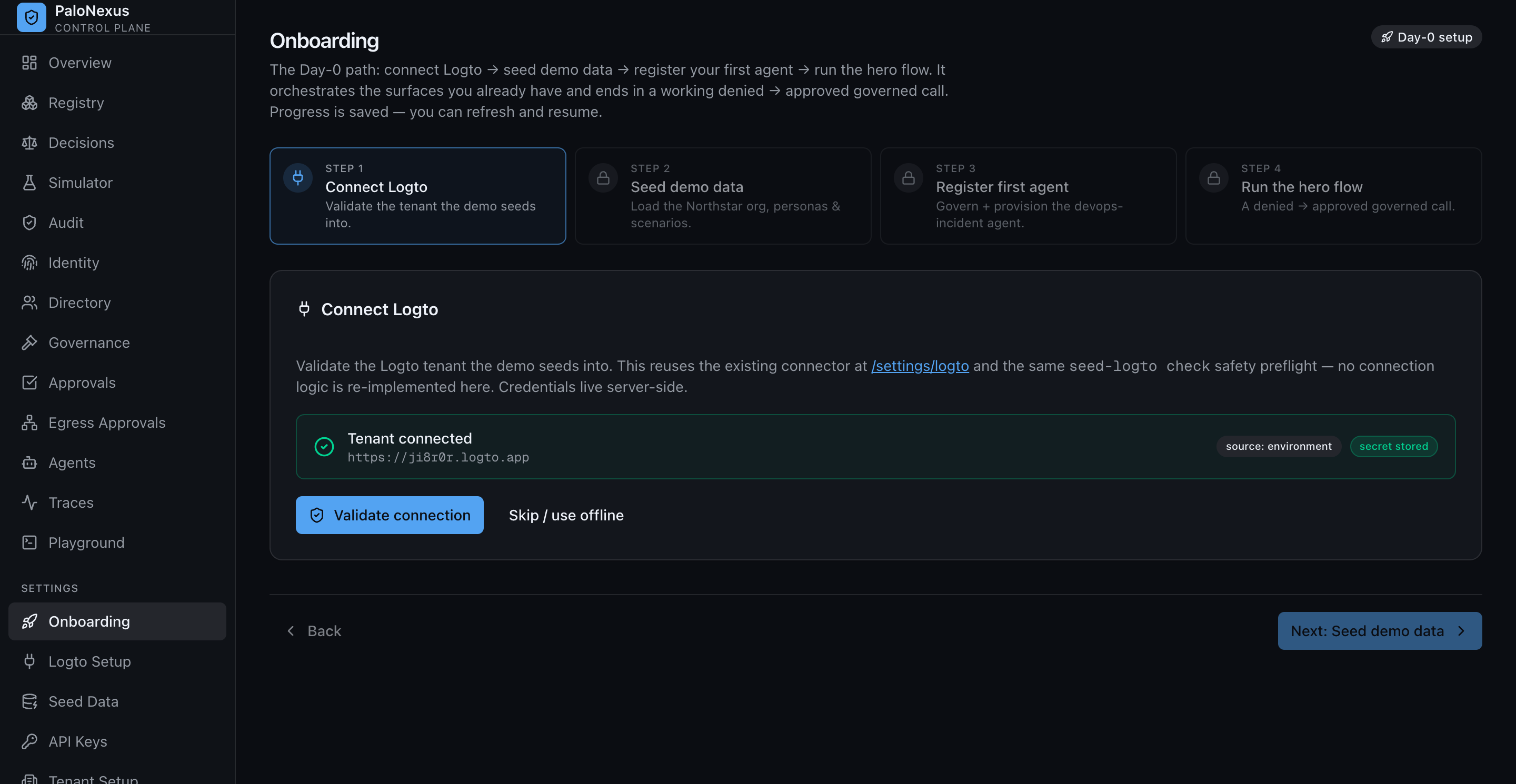
The Day-0 wizard’s ‘Connect Logto’ step connects the organization’s Logto tenant via OpenID Connect (OIDC)/SCIM — see Connect agents to enterprise authority. This quickstart reproduces the same loop entirely offline.
1. Install
Section titled “1. Install”The base package is lean — facade, the ten typed models, the typed error tree, the idp client, and the crypto layer. Framework bindings are opt-in extras.
pip install palonexusThe LangChain and LangGraph extras aren’t needed for this quickstart — the base package ships the offline control plane and the end-to-end governed flow.
2. Initialize
Section titled “2. Initialize”Three ways to build the facade. Always close it (or use it as a context manager).
from palonexus import PaloNexus
# 1. From environment (recommended for real deployments): reads PALONEXUS_* vars.pn = PaloNexus.from_env()
# 2. Explicit:pn = PaloNexus(    control_plane_url="http://localhost:9191",    idp_url="http://localhost:8090",    api_key="pn_live_…",)
# 3. Offline — in-memory FakeControlPlane, no cluster (tests, CI, this page):pn = PaloNexus.offline()
from_env() honors PALONEXUS_OFFLINE=1, so the same code path runs in CI with no cluster:
import osos.environ["PALONEXUS_OFFLINE"] = "1"
from palonexus import PaloNexus
pn = PaloNexus.from_env()   # -> offline modewith pn.task(    subject="ethan.park@northstar.example",    task_id="INC-1",    scenario="devops-incident",    actor="northstar-devops-incident-agent",) as task:    decision = task.check(action="runbooks:read",                          resource="runbooks-api:/runbooks/db-failover")    print("needs_approval:", decision.needs_approval)pn.close()
The env vars from_env() reads: PALONEXUS_CONTROL_PLANE_URL, PALONEXUS_MGMT_URL,
PALONEXUS_IDP_URL, PALONEXUS_API_KEY, PALONEXUS_TENANT_ID, PALONEXUS_AGENT_TOKEN, and
PALONEXUS_OFFLINE. See Configuration & environment.
3. Run the end-to-end flow
Section titled “3. Run the end-to-end flow”PaloNexus.offline() provides an in-memory control plane that reproduces the real
deny-by-default contract. run_hero_flow drives the complete
register → deny → delegate → approve → succeed story end to end:
from palonexus import PaloNexusfrom palonexus.testing import run_hero_flow
with PaloNexus.offline() as pn:    result = run_hero_flow(pn)
print("agent      :", result.agent)print("subject    :", result.subject, "(owner, devops-incident)")print("1) check   : needs_approval =", result.first_decision.needs_approval)print("2) delegate: ", result.delegation.id, "->", result.delegation.status)print("3) authorize: allow =", result.final_decision.allow)print("audit      :", len(result.audit), "hash-chained events, chain_ok =", result.chain_ok)assert result.succeeded   # denied by default, allowed only after approval
Output:
agent : northstar-devops-incident-agentsubject : ethan.park@northstar.example (owner, devops-incident)1) check : needs_approval = True2) delegate: deleg-… -> approved3) authorize: allow = Trueaudit : 2 hash-chained events, chain_ok = TrueThis is the core contract: a regulated action can’t happen until a human with the
org:agents:approve permission approves it, and the decision is recorded
on a tamper-evident audit chain.
4. Run the flow step by step
Section titled “4. Run the flow step by step”run_hero_flow is a convenience wrapper. Here is exactly what it does, using the public SDK
surface — the shape of code a real agent uses:
from palonexus import PaloNexus
with PaloNexus.offline() as pn:    # Register the agent. Owner + sponsor are MANDATORY (the no-orphaned-agents rule):    # omit either and pn.agents.register raises GovernanceError before any network call.    agent = pn.agents.register(        name="northstar-devops-incident-agent",        owner="ethan.park@northstar.example",     # mandatory        sponsor="maya.chen@northstar.example",    # mandatory        scenario="devops-incident",    )    agent.provision()   # mints the agent's did:key + Membership VC (idempotent)
    # A task binds the on-behalf-of subject + incident id + scenario for every call inside it.    with pn.task(        subject="ethan.park@northstar.example",        task_id="INC-4821",        scenario="devops-incident",        actor="northstar-devops-incident-agent",    ) as task:        # 1) Ask the control plane. Deny-by-default: a regulated runbook needs approval.        decision = task.check(            action="runbooks:read",            resource="runbooks-api:/runbooks/db-failover",        )        print("1) check  needs_approval:", decision.needs_approval, "-", decision.reason)
        # 2) Request a task-scoped, time-boxed delegation (starts as 'pending').        deleg = task.request_delegation(            action="runbooks:read",            resource="runbooks-api:/runbooks/db-failover",            reason="INC-4821 db failover",            ttl=300,        )        print("2) delegation:", deleg.id, deleg.status)
        # In production, the approver clicks "Approve" in the portal. Offline, drive the        # in-memory control plane to simulate that human action:        pn._fake.approve_delegation(deleg.id, approver="maya.chen@northstar.example")
        # 3) Re-authorize. Now the delegation lets the call through (raises on deny).        final = task.authorize(            action="runbooks:read",            resource="runbooks-api:/runbooks/db-failover",        )        print("3) authorize allow:", final.allow)
    # Everything is on the tamper-evident audit chain, correlated by task_id.    for ev in pn.audit.tail(task_id="INC-4821"):        print(f"   audit seq={ev.seq} {ev.decision:5} {ev.action}")    assert pn.audit.verify_chain()
1) check needs_approval: True - needs human-approved delegation2) delegation: deleg-… pending3) authorize allow: True audit seq=1 deny runbooks:read audit seq=2 allow runbooks:readMore on each step
Section titled “More on each step”Register accepts richer governance metadata than the minimal call above, and enforces the no-orphaned-agents rule client-side, fail closed, before any network call:
from palonexus import PaloNexus
pn = PaloNexus.offline()
agent = pn.agents.register( name="northstar-devops-incident-agent", owner="ethan.park@northstar.example", # mandatory sponsor="maya.chen@northstar.example", # mandatory team="DevOps", risk_tier="high", # low | medium | high | critical runtime="doks_prod", # an approved runtime scenario="devops-incident", # ties to the seed scenario)identity = agent.provision() # mint did:key + Membership VC (idempotent)print(identity.did) # did:key:z…The mandatory-ownership rule, demonstrated:
from palonexus import PaloNexusfrom palonexus.errors import GovernanceError
with PaloNexus.offline() as pn:    try:        pn.agents.register(name="orphan-agent", owner="", sponsor="")    except GovernanceError as e:        print("rejected:", e)   # agent registration requires an owner (no orphaned agents)
Check vs. authorize. task.check(...) is synchronous and explicit, and returns a typed
PolicyDecision carrying allow, needs_approval, reason, subject, upstream, and
trace_id. It does not raise on deny — inspect allow and needs_approval. It still
raises ControlPlaneUnavailable if the decision point is unreachable (fail closed) — a
check is never a silent allow. task.authorize(...) is check that raises on
non-allow — use it where the deny must stop execution. The typed error tree (catch
the relevant one):
from palonexus.errors import ApprovalRequired, PolicyDenied, ControlPlaneUnavailable
try:    task.authorize(action="runbooks:read",                   resource="runbooks-api:/runbooks/db-failover")except ApprovalRequired as e:        # 401 + needs-approval: drive request_delegation / interrupt    print("needs approval:", e.reason)except PolicyDenied as e:            # 403 hard deny: no path forward    print("denied:", e.reason)except ControlPlaneUnavailable:      # decision point down: fail closed, never a silent allow    raise
The full tree: PaloNexusError (base) → GovernanceError, PolicyDenied,
ApprovalRequired, DelegationExpired, CredentialRevoked, IdentityNotProvisioned,
ControlPlaneUnavailable.
Waiting for a human. On a live cluster the approval isn’t instantaneous — poll until the human decides:
deleg = task.await_delegation(deleg.id, timeout=600) # blocks until approved/denied/expired5. Test the deny path
Section titled “5. Test the deny path”Swap the subject for the seeded negative persona and the same call is a hard deny, not a needs-approval. No delegation can be requested:
from palonexus import PaloNexus
with PaloNexus.offline() as pn:    with pn.task(        subject="claire.evans@northstar.example",   # negative persona        task_id="INC-4821",        scenario="devops-incident",        actor="northstar-devops-incident-agent",    ) as task:        decision = task.check(            action="runbooks:read",            resource="runbooks-api:/runbooks/db-failover",        )        print("allow:", decision.allow, "| needs_approval:", decision.needs_approval)        print("reason:", decision.reason)
allow: False | needs_approval: Falsereason: claire.evans@northstar.example is not authorized for scenario devops-incidentThe two outcomes are distinct: needs_approval means ask a human; a flat
deny with neither allow nor needs_approval means no path forward. See
Glossary for deny-by-default, TBAC, Membership VC,
and the rest of the vocabulary.
6. Revoke
Section titled “6. Revoke”Revoke a single delegation, or cascade everything under an agent. After revocation the next
check is denied again — deny-by-default reasserts immediately:
pn.revoke(deleg, reason="incident closed")          # accepts a Delegation or a raw jti -> True
after = task.check(action="runbooks:read",                   resource="runbooks-api:/runbooks/db-failover")print(after.allow)            # False — the grant is gone
# Revoke everything under an agent (e.g. security response):report = pn.revocation.cascade(parent_did=agent.identity.did)print(report)                 # {'delegations_revoked': N, 'agents_suspended': …, …}
What just happened
Section titled “What just happened”| Step | SDK call | Platform concept |
|---|---|---|
| Register | pn.agents.register(owner=, sponsor=) | Mandatory ownership governance |
| Provision | agent.provision() | did:key + Membership VC minted |
| Bind work | with pn.task(subject=, task_id=, scenario=) | On-behalf-of + Task-Based Access Control (TBAC) task binding |
| Ask | task.check(action=, resource=) | /authz decision (deny-by-default) |
| Delegate | task.request_delegation(...) | Task-scoped, time-boxed grant |
| Approve | (human / portal) | org:agents:approve authority |
| Enforce | task.authorize(...) | Raises ApprovalRequired / PolicyDenied |
| Prove | pn.audit.tail() / verify_chain() | Tamper-evident hash chain |
Two things run locally: this docs site, and the platform itself.
Run the docs site locally
Section titled “Run the docs site locally”The docs site is an Astro Starlight project under
../palonexus-web, served from the /docs context.
cd palonexus-webnpm installnpm run dev # http://localhost:4321/docs/Build the static site (output in dist/):
npm run build # static HTML + Pagefind search indexnpm run preview # serve the built site locallyRun the platform locally (kind)
Section titled “Run the platform locally (kind)”The whole control layer comes up on a local kind cluster with one command (real Kubernetes, nothing mocked). On a Docker-less Mac, use podman.
cd platformmake demo-up # build images, create the kind cluster, apply the overlay, port-forwardThis brings up the full decision stack — gateway, identity, registry, policy, observability, and audit, the implementation mechanisms beneath the five pillars — plus the four demo agents, the Grafana LGTM observability stack (Loki, Grafana, Tempo, Mimir), and the portal. When it finishes, the consoles are port-forwarded:
- Portal — http://localhost:3000 (Overview — the Authority Command Center — Registry, Decisions, Authority Trail, Identity, Authority Delegation, Credential-Safe Enforcement, Agents, Traces)
- Grafana — http://localhost:3001
Tear it down with make demo-down.
Open the portal’s Tenant settings to see the organization defaults applied to every newly registered agent — the org id, the environment, and the default data-class and risk-tier:
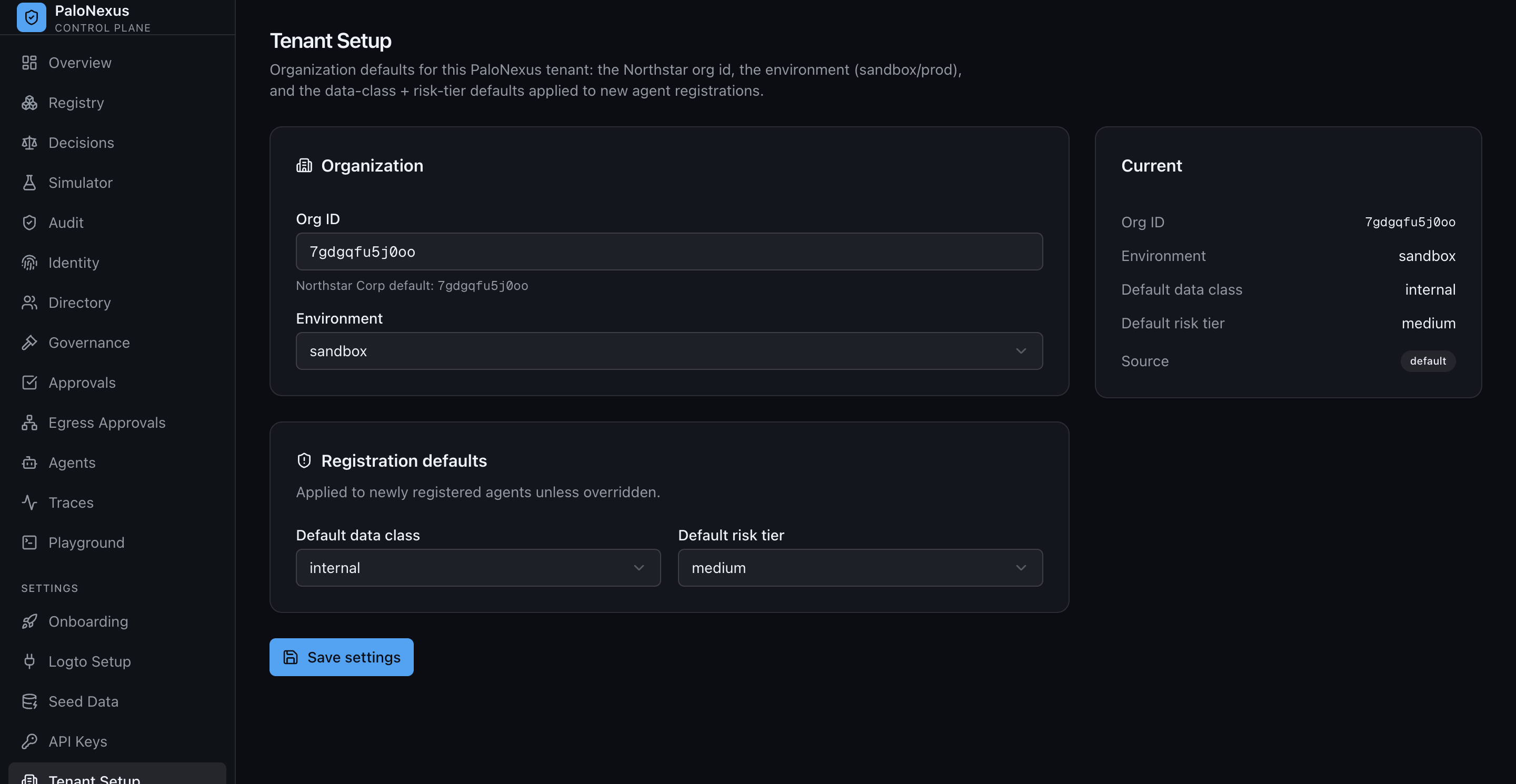
Organization defaults for the tenant: org id, environment, and the data-class and risk-tier
applied to new agents. These feed the dataClass and risk-tier the registry records — see the
Registry schema and Glossary.
Decision engine only (no cluster)
Section titled “Decision engine only (no cluster)”make test # policy matrix + audit hash-chain unit testsmake smoke # boot the binary, exercise allow(200)/deny(403) over ext_authzmake render # render the full Kustomize manifest set (no apply)See the end-to-end flow
Section titled “See the end-to-end flow”With the platform up, run the narrated walkthrough (deny → human-approve → allow → revoke, model allowlist, audit verify):
scripts/demo.shFor the network-layer egress + human egress-approval demo (3 beats), and the fully autonomous multi-agent flow, see Authority delegation and the autonomous flow.
Next steps
Section titled “Next steps”After the SDK walkthrough (tab 1):
- Guard a LangChain tool — drop the gate into
create_agent. - Govern a LangGraph node (HITL) — a human-in-the-loop (HITL) deny → interrupt → approve → resume flow, with the durable-checkpointer requirement.
- SDK overview & layers and the API reference.
- Temporary elevation walkthrough — the end-to-end governed flow, narrated.
- Glossary — every acronym used in these docs.
After running the platform locally (tab 2):